


Phone Id - Fake Caller Buster
4.21.62K Reviews
App Specs
- Version
- 7156
- Updated On
- License
- Free
- Downloads
- 1,000,000+
- Developer
- Fake Caller Bust
- Categories
- Communication
- Platform
- Android
Screenshots
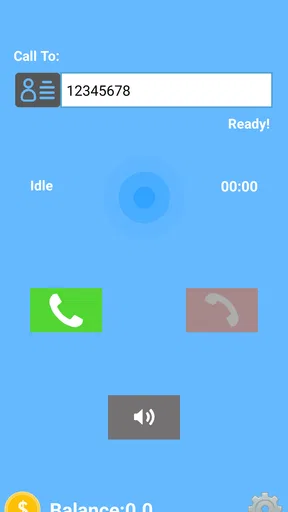
 Analysis by AppCompare
I approach caller-related apps with a little more caution than ordinary novelty tools, because anything involving a phone number can touch on privacy and trust. Phone Id - Fake Caller Buster is a communication app from Fake Caller Bust, and its central idea is to let you call back a number with privacy. That makes it different from a standard fake-call prank app: the name and summary point toward caller identification and private callbacks, so I would judge it less by how amusing it sounds and more by whether its purpose fits the way I handle unfamiliar calls.
What I’d want to know before relying on it
The app has an average rating of 4.2 from around 16,000 ratings, with about 1.6 thousand written reviews and over a million installs. That level of use suggests it has found an audience, but popularity alone does not tell me how it behaves with personal information or whether it suits every caller-identification need. I treat those figures as context, not a substitute for checking the choices shown on my own device.
Trust starts with the choices on your phone
Caller tools can feel personal because they sit close to contacts, call history, and the numbers that reach you. I would not assume that an app is safe or intrusive based only on its category or its name. Instead, I would look at the permission prompts as they appear, ask whether each one makes sense for the action I want to use, and decline anything that does not feel necessary. A permission prompt is a decision point, not a formality to tap through automatically.
The published description does not give me a basis for making claims about specific permissions, data retention, or account controls, so I won’t invent assurances about those areas. My practical advice is to read the app’s current permission requests and privacy information before using it with numbers you consider sensitive. If the app asks for access you are uncomfortable granting, or its purpose is not clear to you at that moment, pause rather than treating access as the price of trying it.
Keep private callbacks deliberate
The callback angle is most useful when I have a concrete reason to return a call but do not want to expose my number casually. For example, if an unfamiliar number leaves a message about a delivery or appointment, I can first decide whether I actually need to respond, then consider whether a private callback is appropriate. That extra pause matters: a privacy-oriented option should help me make a considered call, not encourage me to return every unknown ring.
I would also separate a private callback from a guarantee of anonymity. The wording describes calling back with privacy, but that is not enough on its own to establish exactly what the recipient sees, how the call is routed, or what records may exist elsewhere. Before using it for a sensitive conversation, I would test the experience in a low-stakes situation and check what the app explains on screen. If full confidentiality is essential, a purpose-built, clearly documented communication channel may be a better fit.
Where it fits among caller tools
Compared with a phone’s built-in call screening or blocking controls, a dedicated caller app may be more convenient if its private callback function is the specific feature I need. Built-in controls are often the simpler choice when my goal is just to silence unknown callers, block a repeat nuisance number, or review missed calls without adding another app. Those tasks do not automatically require a separate service.
Worth Reading Before You Choose

EA SPORTS FC Mobile 26 Is a Bigger Football Game, but It Takes Time

Flipboard Shows What News Apps Must Do Beyond the Feed

Switching to Android Auto Means Rethinking Your Driving Routine

Google Calendar Makes a Crowded Week Easier to Manage

Ludo King Makes the Most of the Minutes Between Plans

Baby Panda World Brings Quick Play to Modern Phones, but Its Game Library Feels Busy
It also occupies a different space from contact-identification apps that focus on labeling incoming numbers. Identifying who might be calling and returning a call privately are related problems, but they are not interchangeable. I would choose based on the moment: if I mainly want to avoid answering spam, I’d start with the phone’s native settings; if I need the particular callback approach this app offers, I’d assess its on-device permissions and instructions before relying on it.
The app is free to download, while in-app purchases range from $9.99 to $49.99 per item. I’d check what a paid item includes before buying, especially if I only need an occasional callback. A free install is an easy way to inspect the experience, but it does not mean every useful option is necessarily free. The app is rated for Everyone, and its current version is 7156; it requires Android 8.0 or later. Those details make compatibility worth checking before I spend time setting it up.
Small habits that reduce avoidable risk
One useful habit is to avoid entering or saving more information than the task requires. If I am testing a caller tool, I can begin with a non-sensitive number and a low-stakes call rather than immediately using a work contact, family member, or private matter. This lets me see how the callback flow works and what choices appear without putting an important conversation in the middle of an unfamiliar process.
Another is to review the app’s access from the phone settings after setup. Permissions can usually be revisited there, so I don’t have to treat my first choice as permanent. If I stop using the app, I can remove access I no longer need or uninstall it. This is especially sensible for a communication tool that may not be part of my everyday routine.
I would be careful about using a private callback to mislead someone or to create a false impression in a situation where trust matters. A privacy feature is most defensible when it protects my number while I return a legitimate call, not when it is used to impersonate someone or evade accountability. That distinction is practical as well as ethical: the more important the conversation, the less I want ambiguity about who is calling.
Who is likely to find it useful
I can see the appeal for someone who regularly needs to return calls from unfamiliar numbers and wants an option that is not simply calling back from their personal line. It may also suit people who prefer to keep work inquiries separate from a personal number, provided the app’s actual callback flow meets their needs and they are comfortable with its visible permissions and privacy terms.
It is less compelling if I rarely call unknown numbers, already have a reliable work line, or mainly want spam filtering. In those cases, the extra setup and any purchase prompts may not be worthwhile. I would also skip it for a high-stakes confidential conversation unless I had first verified that the specific way it handles the call matches my privacy requirements. The right choice depends less on a broad promise of privacy and more on the exact call I need to make.
What I’d check during a first try
On a first run, I’d pay attention to three things: what the app asks permission to access, what explanation it gives before a callback, and whether I can complete the task without supplying information I do not want to share. I’d also look for a clear way to manage any account or purchase choices that appear. These checks answer more useful questions than simply deciding whether the interface feels polished.
If a contact asks how I called or whether my number was visible, I would not guess based on the app’s name. I’d confirm the behavior in a low-risk test first, because the recipient’s caller display can vary with the service and phone setup involved. Likewise, I would not assume that a private callback blocks every form of identification or removes call records. It is better to understand the limits before depending on the feature.
My cautious verdict
My view is that Phone Id - Fake Caller Buster is worth considering when private callbacks solve a real problem for you, but I would approach it as a tool to evaluate rather than a blanket privacy guarantee. Its communication focus and large audience make it a plausible option to investigate, while the paid items and the need to judge permissions carefully are reasons to take a moment before committing.
If I needed to return an ordinary missed call, I would use the simplest method that suits the situation. If I had a genuine reason to keep my personal number out of a callback, I’d test this app with a harmless call, review the choices it presents, and only then decide whether it deserves a place on my phone. That careful first step is the difference between using a privacy feature thoughtfully and trusting more than I have actually checked.
Have you ever needed a bit of creativity to prank your friends with a fake call? Or maybe you’re looking to get out of an awkward situation with a well-timed phone ring? Well, let me introduce you to Phone Id - Fake Caller Buster. I’ve had some fun experimenting with this app, and it’s definitely worth a look if you’re into a bit of harmless mischief or simply need an alibi on demand.
Getting Started with Phone Id - Fake Caller Buster
Downloading and setting up Phone Id - Fake Caller Buster is a breeze. Available for both Android and iOS, you can find it on the App Store or Google Play Store. Once installed, the interface is pretty straightforward, which is something I genuinely appreciate. No need to fumble around trying to figure out how to make it work — it’s all laid out for you in a user-friendly manner.
First things first, you’ll need to grant the app the necessary permissions. I know, I know, permissions can sometimes feel a bit invasive, but rest assured, these are pretty standard and essential for the app to function effectively. Once you’re through with that, you’re ready to dive into the fun stuff!
Exploring the Features
One of the standout features of this app is its ability to customize fake calls in a variety of ways. You can set the caller name, number, and even choose a specific ringtone to make the call seem more authentic. I’ve had a blast trying out different combinations to see just how convincing I could make it.
There’s also an option to schedule calls. This feature is a lifesaver when you want to plan ahead. Whether you need to escape an awkward date or want a convenient reason to leave a meeting, you can set the app to ring at just the right moment. I tried scheduling a call during a long family dinner, and it worked like a charm.
Customization and Realism
To make the calls even more realistic, Phone Id - Fake Caller Buster allows you to add a voice recording. This is where you can get really creative. Record a short message that plays when you "answer" the call, and you’re guaranteed to fool just about anyone. I recorded a quick "Hey, I’m outside," and the reactions were priceless.
The app also lets you choose from a list of pre-recorded voices if you’re not in the mood to do your own recording. This is a handy feature and adds to the realism of the experience. I experimented with the different voices, and it’s surprising how convincing they can be.
Why You’ll Love It
If you’re like me and enjoy a good laugh or need a trusty sidekick to help you navigate social situations, this app is a must-have. Its ease of use and the ability to personalize calls make it a versatile tool. Plus, the joy of pulling off a successful prank call is simply unbeatable.
There’s something inherently fun about being able to create a scenario and watch it unfold, knowing you’re the mastermind behind it. And let’s be honest, who doesn’t enjoy a bit of harmless fun every now and then?
Wrapping Up
At the end of the day, Phone Id - Fake Caller Buster is an entertaining app that does exactly what it promises. It’s easy to use, packed with features, and offers a delightful way to bring a little fun into your daily routine. Whether you’re a prankster at heart or just need a bit of help getting out of commitments, this app has got your back.
If you’re interested in giving it a try, head over to your app store and download it. You might just find it becoming one of your go-to tools for adding a dash of creativity to your social interactions. Just remember, with great power comes great responsibility — use it wisely!
Pros
- Easy to use interface for all ages.
- Customizable caller ID settings.
- Lightweight app
- minimal storage needed.
- No intrusive ads during use.
- Quick setup with seamless operation.
Cons
- Limited features in free version.
- Occasional glitches in call simulation.
- Requires internet connection to function.
- Lacks integration with other apps.
- No support for older Android versions.
FAQs for Phone Id - Fake Caller Buster
What is Phone Id - Fake Caller Buster and how does it work?
Phone Id - Fake Caller Buster is an app designed to help you identify and block fraudulent or spam calls. It works by using a vast database of known fake numbers and leveraging advanced algorithms to detect unusual call patterns. Once a suspicious call is identified, the app can automatically block it or warn you, ensuring a safer and more peaceful calling experience.
Is Phone Id - Fake Caller Buster free to use?
The app offers a free version with basic features, allowing you to identify and block a limited number of calls. For more comprehensive protection, including advanced call identification and personalized blocking options, a premium version is available through a subscription. This ensures users can choose the level of protection that suits their needs and budget.
How does Phone Id - Fake Caller Buster maintain user privacy?
Phone Id - Fake Caller Buster prioritizes user privacy by ensuring that all data handling complies with strict privacy regulations. The app does not share your personal information or call logs with third parties without your consent. Additionally, all data related to call blocking and identification is processed securely, ensuring your information remains private.
Can Phone Id - Fake Caller Buster block international calls?
Yes, Phone Id - Fake Caller Buster can block international calls. The app allows users to customize their settings to block calls from specific countries or regions. This feature is particularly useful for avoiding scams that originate from foreign numbers, providing users with greater control over who can reach them.
Does Phone Id - Fake Caller Buster affect battery life?
Phone Id - Fake Caller Buster is designed to run efficiently in the background, minimizing its impact on battery life. While any app running continuously can slightly affect battery usage, Phone Id - Fake Caller Buster uses optimized processes to ensure it does not significantly drain your device's power. Regular updates keep the app running smoothly and efficiently.


